Quiz 02 Practice
Lists
Conceptual Questions
Explain in words how you modify elements in a list? How would you do this in python? Give an example.
Write the general formula of how you call a method on an object (such as a list, set, or dictionary) using the following. You might not need to use all of the following options, and can use any multiple times:
<method_name>,(),<object_variable>,.,<arg>. Give examples.Give two ways of instantiating an empty list. What are the components you need and what does each part do? Give an example for each. Your explanation should include the words ‘function’, ‘constructor’, ‘variable’, ‘instantiate’, ‘assign’, and ‘reference’.
SHOW SOLUTIONS
In order to modify elements in a list, you first need to identify the element you want to change. Then you must find where the element is within your object. Once you have access to the element’s position, you then want to assign at that position in the list to the desired value. Lists in Python are ordered collections, which means each element has a specific index that starts from 0. You can access elements in a list using these indices.
To access an element, use the index inside square brackets
[]. To modify an element, you use the assignment operator=.For example:
    # example
    my_list: list[“bark”, “meow”, “tweet”] # Change “meow” to “moo”
In this example, we want to change “meow”, which is at index 1, to “moo”. Using the square brackets for subscription notation, we assign a new value at that index like this:
my_list[1] = “moo”<object_variable>.<method_name>(<arg>)For more arguments, you’d have
<object_variable>.<method_name>(<arg>, <arg>)And so on.
    # example
    my_list.pop(0)
    my_list.append(“Hello”)
Two ways of instantiating an empty list:
- Using the list constructor: The
list()function is a constructor that instantiates an empty list object. The constructor belongs to theListclass. The constructor doesn’t take any arguments for creating an empty list. You assign the result of this function to a variable, which will reference the newly created empty list.
Example:
python empty_list: list[str] = list()- Components:
list(): The constructor function that creates a new list object.list[str]: This is the type ofempty_list, it is alistthat will containstrs (it could also contain other types of data likeints). Always include a type when declaring a new variable!empty_list: A variable that is assigned the reference to the new list object created by thelist()constructor.
- Using square brackets literal: You can instantiate an empty list using a pair of square brackets
[]. This directly creates and instantiates a new empty list object, which you then assign to a variable.
Example:
python empty_list: list[str] = []- Components:
[]: This is shorthand syntax for creating and instantiating an empty list object.list[str]: This is the type ofempty_list, it is alistthat will containstrs (it could also contain other types of data likeints). Always include a type when declaring a new variable!empty_list: A variable that is assigned the reference to the newly instantiated empty list.
- Using the list constructor: The
for loops
Conceptual Questions
Refer to the following code snippet to answer these questions:
py stats: list[int] = [7, 8, 9] index: int = 0 total: int = 100 while index < len(stats): total -= stats[index] index += 11.1. Rewrite the following code snippet with same functionality using a
for ... inloop.1.2. Rewrite the following code snippet with same functionality using a
for ... in range(...)loop.(Challenge Question) Can you iterate through an object using a
forloop while also modifying it (removing or adding elements)?
SHOW SOLUTIONS
Original code copied for reference:
py stats: list[int] = [7, 8, 9] index: int = 0 total: int = 100 while index < len(stats): total -= stats[index] index += 11.1.stats: list[int] = [7, 8, 9] total: int = 100 for elem in stats: total -= elem1.2
    stats: list[int] = [7, 8, 9]
    total: int = 100
    for index in range(0, len(stats)):
        total -= stats[index]
No, generally you cannot safely iterate through an object (like a list or dictionary) while simultaneously modifying it by adding or removing elements during the iteration. Doing so can lead to unexpected behavior or errors like the
RuntimeError: dictionary changed size during iteration. When you iterate over an object, Python keeps track of the size and structure of that object. If you modify it (e.g., by adding or removing elements), this can disrupt the iteration process because the underlying data structure changes during traversal.Removing elements: Can cause the iteration to skip items or crash because the index or key you’re iterating over might no longer exist. Adding elements: Can lead to the same type of issue, as the size of the object changes unexpectedly, leading to errors.
Take for example this code:
    def add_task(todo_list, task):
        task_found: bool = False
        for existing_task in todo_list:
            if existing_task == task:
                task_found = True

            if not task_found:
                todo_list[task] = 'not done'

    def mark_done(todo_list, task):
        for existing_task in todo_list:
            if existing_task == task:
                todo_list[existing_task] = 'done'

    def main():
        todo_list: dict[str, str] = {'Buy groceries': 'not done', 'Read a book': 'done', 'Write report': 'not done', 'Call mom': 'done'}

        add_task(todo_list, 'Finish homework')

        mark_done(todo_list, 'Write report')

        print("Current to-do list:", todo_list)

    if __name__ == "__main__":
        main()
Dictionaries
Conceptual Questions
For the following, make sure that for each question you could justify or provide an example of your answer using either memory diagrams or code in VS code.
- Dictionaries in Python can have duplicate keys. (T/F)
- Dictionaries in Python can be nested, meaning a dictionary can contain another dictionary as a value. (T/F)
- Can you remove only a key without removing a value (or vice versa)?
- What act as your indices in a dict?
- Explain in words how you modify elements in a dict? How would you do this in python? Give an example.
- How do you remove elements in a dict? What does this actually remove?
- How do you modify a key in a dict?
- Write the general formula of how you remove a key-value pair to a dictionary object using the following. You might not need to use all and can use any multiple times:
pop,append,(),<object_variable>,.,<key>,<value>, and[]. Give examples. - Write the general formula of how you remove a key-value pair to a dictionary object using the following. You might not need to use all and can use any multiple times:
pop,append,(),<object_variable>,.,<key>,<value>, and[]. Give examples.
SHOW SOLUTIONS
False. Python dictionaries cannot have duplicate keys. Each key in a dictionary must be unique. If you attempt to create a dictionary with duplicate keys, the latest key-value pair will overwrite the previous one. For example:
    my_dict = {"a": 1, "a": 2}
    print(my_dict)
    # Output: {'a': 2}
True, Python dictionaries can be nested. This means that a dictionary can hold another dictionary as a value. You can use this feature to create more complex data structures. For example:
    nested_dict = {
        "key1": {"nested_key1": 1, "nested_key2": 2},
        "key2": {"nested_key3": 3, "nested_key4": 4}
    }
False. No, you cannot remove just a key or just a value in a dictionary. A key-value pair is considered a single entity in a dictionary. If you remove the key, the corresponding value is also removed.
In a Python dictionary, the keys act as the “indices.” Unlike lists, where numerical indices are used to access elements, dictionaries use keys to access values and these keys can be of any type. Each key must be unique, and it serves as the identifier for accessing the corresponding value. For example:
    my_dict = {"name": "Alice", "age": 25}
    print(my_dict["name"])  # Output: Alice
To modify an element in a Python dictionary, you use the key associated with the value you want to change. You can access the value using the key, and then assign a new value to it. In order to access the value, we use subscription notation,
[], on the object that we want to access the value at. This replaces the old value with the new one.my_dict = {"name": "Alice", "age": 25} my_dict["age"] = 26 # Modifying the value associated with the key "age" print(my_dict) # Output: {"name": "Alice", "age": 26}To remove elements from a dictionary, we use the the
pop()method. This method will remove the key and its corresponding value (key-value pair). Thepop()method allows you to retrieve the value that was removed (not discussed in lecture but a very cool fact).my_dict = {"name": "Alice", "age": 25} removed_value = my_dict.pop("age") # Removes the key "age" and returns the value print(my_dict) # Output: {"name": "Alice"} print(removed_value) # Output: 25To modify a key in a Python dictionary, we can follow these steps:
- Add a new key with the same value as the old key.
- Use pop() to remove the old key-value pair.
my_dict = {"name": "Alice", "age": 25} # Step 1: Create a new key-value pair using the value from the old key my_dict["years_old"] = my_dict.pop("age") print(my_dict) # Output: {"name": "Alice", "years_old": 25}<object_variable>.pop(<key>)my_dict = {"name": "Alice", "age": 25} removed_value = my_dict.pop("name") # Removes the key "name" and returns its value print(my_dict) # Output: {"age": 25}<object_variable>[<key>] = <value>my_dict = {"name": "Alice", "age": 25} my_dict["location"] = "New York" # Adds a new key-value pair to the dictionary print(my_dict) # Output: {"name": "Alice", "age": 25, "location": "New York"}
Practice Questions
Create a new dictionary called
my_dictionarywithstrkeys andfloatvalues and initialize it as an empty dictionary.Using the following dictionary,
msg: dict[str, int] = {"Hello": 1, "Yall": 2}, access the value stored under key “Yall”.Using the following dictionary,
msg: dict[str, int] = {"Hello": 1, "Yall": 2}, increase the value stored under key “Yall” by 3.Using the following dictionary,
ids: dict[int, str] = {100: "Alyssa", 200: "Carmine"}, remove the value “Alyssa”, stored at key 100.Using the following dictionary,
ids: dict[int, str] = {100: "Alyssa", 200: "Carmine"}, write a line of code to get the number of key/value pairs in the dictionary.Using the following dictionary,
inventory: dict[str, int] = {"pens": 10, "notebooks": 5, "erasers": 8}, add a new key-value pair"markers": 15.Using the following dictionary,
prices: dict[str, float] = {"bread": 2.99, "milk": 1.99, "eggs": 3.49}, update the value of"milk"to2.50.Using the dictionary
scores: dict[str, int] = {"Alice": 85, "Bob": 90, "Charlie": 88}, print out all the keys in the dictionary.Using the dictionary
scores: dict[str, int] = {"Alice": 85, "Bob": 90, "Charlie": 88}, write a line of code that returns the sum of all the values (scores) in the dictionary. Assume that we have a written asumfunction that will do this for us when passing in adict. Store this value in a variabletotal_score.9.1. Write the same line of code except using key-word arguments assuming that the only parameter in
sumis calledinp_dict.Using the dictionary
fruit_count: dict[str, int] = {"apples": 5, "bananas": 8}, iterate over the key-value pairs and print them in the format “key: value”.Create a new dictionary by combining the two dictionaries. Store this new object by assiging it’s reference to a variable called
combo_dict:
    first_dict: dict[str, int] = {"a": 1, "b": 2}
    second_dict: dict[str, int] = {"c": 3, "d": 4}
SHOW SOLUTIONS
my_dictionary: dict[str, float] = {}ormy_dictionary: dict[str, float] = dict()msg["Yall"]msg["Yall"] += 3ormsg["Yall"] = 5ids.pop(100)len(ids)inventory["markers"] = 15prices["milk"] = 2.50Code below:
    for x in scores:
        print(x)
total_score = sum(scores)9.1.
total_score = sum(inp_dict=scores)Code below:
    for boo in fruit_count:
        ghost = fruit_count[boo]
        print(f"{boo}: {ghost}")
combo_dict: dict[str, int] = {"a": 1, "b": 2, "c": 3, "d": 4}
Function Writing Practice
Note: Make sure to click the “Show Solutions” button to reveal the solutions before using one of the “Solution” links underneath each function’s description.
Lists
odd_and_even
The function name is
odd_and_evenand has alist[int]parameter.The function should return a
list[int].The function should return a new
listcontaining the elements of the input list that are odd and have an even index.The function should not mutate (modify) the input list.
Explicitly type variables, parameters, and return types.
The following REPL examples demonstrate expected functionality of your
value_existsfunction:>>> odd_and_even([2,3,4,5]) [] >>> odd_and_even([7, 8, 10, 10, 5, 12, 3, 2, 11, 8]) [7, 5, 3, 11]
short_words
The function name is
short_wordsand has alist[str]as a parameter.The function should return a new
list[str]of the words from the input list that are shorter than 5 characters.If a word is not added to the new list because it is too long,the function should print a string stating that it was too long.
The function should not mutate(modify) the input list.
Explicitly type variables, parameters, andreturn types.
Include a Docstring that says: Returns list of words that are shorter than 5 characters.
The following REPL examples demonstrate expected functionality of your function:
  >>> weather: list[str] = ["sun", "cloud", "sky"]
  >>> short_words(weather)
  cloud is too long!
  ['sun', 'sky']
multiples
Write a function called multiples. Given a list[int], multiples should return a list[bool] that tells whether each int value is a multiple of the previous value. For the first number in the list, you should wrap around the list and compare this int to the last number in the list.
Example: multiples([2, 3, 4, 8, 16, 2, 4, 2]) should return [True, False, False, True, True, False, True, False].
reverse_multiply
Write a function called reverse_multiply. Given a list[int], reverse_multiply should return a list[int] with the values from the original list doubled and in reverse order.
Example: reverse_multiply([1, 2, 3]) should return [6, 4, 2].
process_and_reverse_list
Your function, process_and_reverse_list, should follow a structured approach to transform the input list. Given a list[int], process_and_reverse_list should firstly square each element in the list, effectively calculating the square of every integer present. Following this, you must compute the sum of each pair of adjacent squared integers and store these sums in a new list. In cases where the input list contains an odd number of elements, the last element should remain unchanged, as it does not have a pair. Finally, the function should reverse the order of this new list of summed pairs, ensuring that the reversed list is returned as the final output.
bubble_up_sort and insert
insert:
- The function name is
insertand has two parameters: alist[int]and anintto be inserted. - The function inserts the given integer into the list.
- After inserting, the function calls another helper function
bubble_up_sortto sort the list in ascending order using a “bubble up” method. - The function mutates the input list by modifying it in place (no return value).
- Explicitly type variables, parameters, and return types.
- There is no need for a return statement since the list is modified directly.
bubble_up_sort:
The function name is
bubble_up_sortand has alist[int]as a parameter.The function iterates through the list, starting from the last element and comparing it to the second-to-last element.
If the second-to-last element is larger than the last element, the two elements are swapped to move the smaller value upward.
This process is repeated by shifting both indices (second-to-last and last) toward the beginning of the list until the entire list is sorted in ascending order.
Explicitly type variables, parameters, and return types.
The function mutates the list by sorting it in place and does not return anything.
The following REPL examples demonstrate expected functionality of your function:
  >>> a: list[int] = []
  >>> insert(a, 10)
  >>> insert(a, 19)
  >>> insert(a, 5)
  >>> insert(a, 2)
  >>> insert(a, 1)
  >>> insert(a, 0)
  >>> insert(a, 14)
  >>> insert(a, -4)
  >>> insert(a, 9)
  >>> print(a)
  [-4, 0, 1, 2, 5, 9, 10, 14, 19]
Dictionaries
value_exists
The function name is value_exists and is called with a
dict[str,int]and anintas an argument.The function should return a
bool.The function should return
Trueif theintexists as a value in the dictionary, andFalseotherwise.The function should not mutate (modify) the input dict.
Explicitly type variables, parameters, and return types.
The following REPL examples demonstrate expected functionality of your
value\_existsfunction:>>> test_dict: dict[str,int] = {"a": 2, "b": 4, "c": 7, "d": 1} >>> test_val: int = 4 >>> value_exists(test_dict, test_val) True >>> value_exists(test_dict, 5) False
plus_or_minus_n
- The function name is
plus_or_minus_nand is called withinp: dict[str,int]andn: intas an argument. - The function should return
None. It instead mutates the input dictionaryinp. - The function should check if each value in
inpis even or odd. If it is even, addnto that value. If it is odd, subtractn. - Explicitly type variables, parameters, and return types.
- The following REPL examples demonstrate expected functionality of your function:
free_biscuits
Write a function called free_biscuits. Given a dictionary with str keys (representing basketball games) and list[int] values (representing points scored by players), free_biscuits should return a new dictionary of type dict[str, bool] that maps each game to a boolean value for free biscuits. (True if the points add up to 100+, False if otherwise)Example:
free_biscuits({ “UNCvsDuke”: [38, 20, 42] , “UNCvsState”: [9, 51, 16, 23] }) should return { “UNCvsDuke”: True, “UNCvsState”: False }.
    >>> test_dict: dict[str,int] = {"a": 2, "b": 4, "c": 7, "d": 1}
    >>> test_val: int = 4
    >>> plus_or_minus_n(test_dict, test_val)
    >>> test_dict
    {"a": 6, "b": 8, "c": 3, "d": -3}
max_key
Write a function called max_key. Given a dictionary with str keys and list[int] values, return a str with the name of the key whose list has the highest sum of values. Example: max_key({"a": [1,2,3], "b": [4,5,6]}) should return "b" because the sum of a’s elements is 1 + 2 + 3 = 6 and the sum of b’s elements is 4 + 5 + 6 = 15, and 15 > 6.
merge_lists
Write a function called merge_lists. Given a list[str] and a list[int], merge_lists should return a dict[str, int] that maps each item in the first list to its corresponding item in the second (based on index). If the lists are not the same size, the function should return an empty dictionary.
Example: merge_lists([“blue”, “yellow”, “red”], [5, 2, 4]) should return {"blue": 5, "yellow": 2, "red": 4}.
SHOW SOLUTIONS
Note: Your solution does not need to be identical to these, these are just examples of one of many possible solutions!
Lists
odd_and_even solution
    def odd_and_even(list1: list[int]) -> list[int]:
        """Find the odd elements with even indexes."""
        i: int = 0
        list2: list[int] = []

        while i < len(list1):
            if list1[i] % 2 == 1 and i % 2 == 0:
                list2.append(list1[i])
            i += 1

        return list2
short_words solution
    def short_words(inp_list: list[str]) -> list[str]:
        """Filter out the shorter words"""
        ret_list: list[str] = []
        for x in inp_list:
            if len(x) < 5:
                ret_list.append(x)
            else:
                print(f"{x} is too long!")
        return ret_list
multiples solution
    def multiples(vals: list[int]) -> list[bool]:
        mults: list[bool] = []
        # check first value against last value
        # a is a multiple of b means a % b == 0
        mults.append(vals[0] % vals[len(vals) - 1] == 0)
        # start idx at 1 since we already checked idx 0
        idx: int = 1
        while idx < len(vals):
            # a is a multiple of b means a % b == 0
            mults.append(vals[idx] % vals[idx - 1] == 0)
            idx += 1
        return mults
def multiples(vals: list[int]) -> list[bool]:
mults: list[bool] = []
# check first value against last value
# a is a multiple of b means a % b == 0
if vals[0] % vals[len(vals) - 1] == 0:
mults.append(True)
else:
mults.append(False)
# start idx at 1 since we already checked idx 0
idx: int = 1
while idx < len(vals):
# a is a multiple of b means a % b == 0
if vals[idx] % vals[idx - 1] == 0:
mults.append(True)
else:
mults.append(False)
idx += 1
return multsreverse_multiply solution
    def reverse_multiply(vals: list[int]) -> list[int]:
        """Reverse the list and double all elements."""
        # iterate through the list backwards
        idx: int = len(vals) - 1 # index of last element
        new_vals: list[int] = []
        while idx >= 0:
            new_vals.append(vals[idx] * 2)
            idx -= 1
        return new_vals
def reverse_multiply(vals: list[int]) -> list[int]:
"""Reverse the list and double all elements."""
# iterate through the list forwards, but get index of the "opposite" element
idx: int = 0 # index of last element
new_vals: list[int] = []
while idx < len(vals):
idx_of_opposite: int = len(vals) - 1 - idx
new_vals.append(vals[idx_of_opposite] * 2)
idx += 1
return new_valsprocess_and_reverse_list Solution
    def process_and_reverse_list(lst):
    # Initialize a list to hold squared elements
    squared_list = []


    # Squaring each element using a while loop
    index = 0
    while index < len(lst):
        squared_value = lst[index] * lst[index]
        squared_list.append(squared_value)
        index += 1


    # Initialize a list to hold the sum of adjacent pairs
    summed_pairs = []


    # Sum adjacent pairs using a while loop
    index = 0
    while index < len(squared_list) - 1:
        pair_sum = squared_list[index] + squared_list[index + 1]
        summed_pairs.append(pair_sum)
        index += 2  # Move by two to get pairs


    # Handle odd number of elements by adding the last squared element
    if len(squared_list) % 2 != 0:
        summed_pairs.append(squared_list[-1])


    # Reverse the summed_pairs list using a while loop
    reversed_list = []
    index = len(summed_pairs) - 1


    while index >= 0:
        reversed_list.append(summed_pairs[index])
        index -= 1


    return reversed_list

    # Test Cases
    print(process_and_reverse_list([1, 2, 3, 4]))  # Output: [13, 5]
    print(process_and_reverse_list([10, 20, 30]))  # Output: [900, 500]
    print(process_and_reverse_list([5]))           # Output: [25]
    print(process_and_reverse_list([7, 8, 9]))     # Output: [145, 49]
bubble_up_sort and insert Solution
    def insert(list: list[int], num_to_insert: int) -> None:
        list.append(num_to_insert)
        bubble_up_sort(list)


    def bubble_up_sort(list: list[int]) -> None:
        second_to_last_idx: int = len(list) - 2
        last_idx: int = len(list) - 1
        while last_idx > 0:
            val_sec_to_last: int = list[second_to_last_idx]
            val_last: int = list[last_idx]
            if list[second_to_last_idx] > list[last_idx]:
                # swap
                list[last_idx] = val_sec_to_last
                list[second_to_last_idx] = val_last


            last_idx -= 1
            second_to_last_idx -= 1

    # example
    a: list[int] = []
    insert(a, 10)
    insert(a, 19)
    insert(a, 5)
    insert(a, 2)
    insert(a, 1)
    insert(a, 0)
    insert(a, 14)
    insert(a, -4)
    insert(a, 9)
    print(a)  # expected [-4, 0, 1, 2, 5, 9, 10, 14, 19]
Dictionaries
value_exists solution
    def value_exists(d: dict[str, int], num: int) -> bool:
        for key in d:
            if d[key] == num:
                return True
        return False
def value_exists(d: dict[str, int], num: int) -> bool:
exists: bool = False
for key in d:
if d[key] == num:
exists = True
return existsplus_or_minus_n solution
    def plus_or_minus_n(inp: dict[str, int], n: int) -> None:
        for key in inp:
            if inp[key] % 2 == 0:
                inp[key] = inp[key] + n
            else: # element is odd
                inp[key] = inp[key] - n
def plus_or_minus_n(inp: dict[str, int], n: int) -> None:
for key in inp:
if inp[key] % 2 == 0:
inp[key] += n
else: # element is odd
inp[key] -= nfree_biscuits solution
    def free_biscuits(input: dict[str, list[int]]) -> dict[str, bool]:
        """Check each game to see if we get free biscuits."""
        result: dict[str, bool] = {}
        # loop over each key in my input dictionary
        for key in input:
            # for each element of the dictionary, sum up its values
            list_to_sum: list[int] = input[key]
            sum: int = 0
            # loop through list and add each value to sum
            for element in list_to_sum:
                sum += element
            # if sum >= 100, store in result under key "key" with value True
            if sum >= 100:
                result[key] = True
            else: # if not, store as False
                result[key] = False
        return result
max_key solution
    def max_key(input: dict[str, int]) -> str:
        # Create variables to store max key and max val sum
        max_key: str = ""
        max_val_sum: int = 0
        # Loop through each key of the dictionary
        for key in input:
            # Sum up the values of that key's corresponding list
            val_sum: int = 0
            for value in input[key]:
                val_sum += value
            # If the sum is the max so far, update the max_key and max_val_sum
            if val_sum > max_val_sum:
                max_val_sum = val_sum
                max_key = key
        return max_key
merge_lists solution
    def merge_lists(words: list[str], vals: list[int]) -> dict[str, int]:
        # If the lists are not same size return empty dict
        if len(words) != len(vals):
            return {}
        idx: int = 0
        merged: dict[str, int] = {}
        while idx < len(words):
            # at key words[idx] store the number at vals[idx]
            merged[words[idx]] = vals[idx]
            idx += 1
        return merged
Memory Diagrams
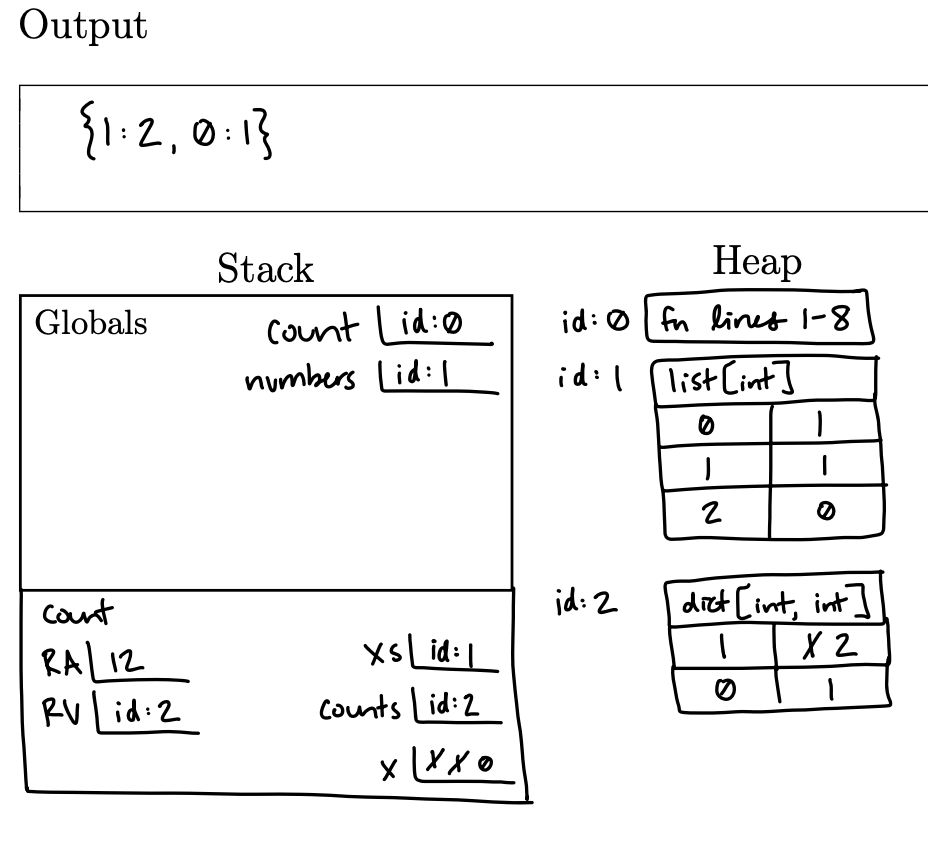
- Create a memory diagram for the following code listing.
def count(xs: list[int]) -> dict[int, int]:
    counts: dict[int, int] = {}
    for x in xs:
        if x in counts:
            counts[x] += 1
        else:
            counts[x] = 1
    return counts


numbers: list[int] = [1, 1, 0]
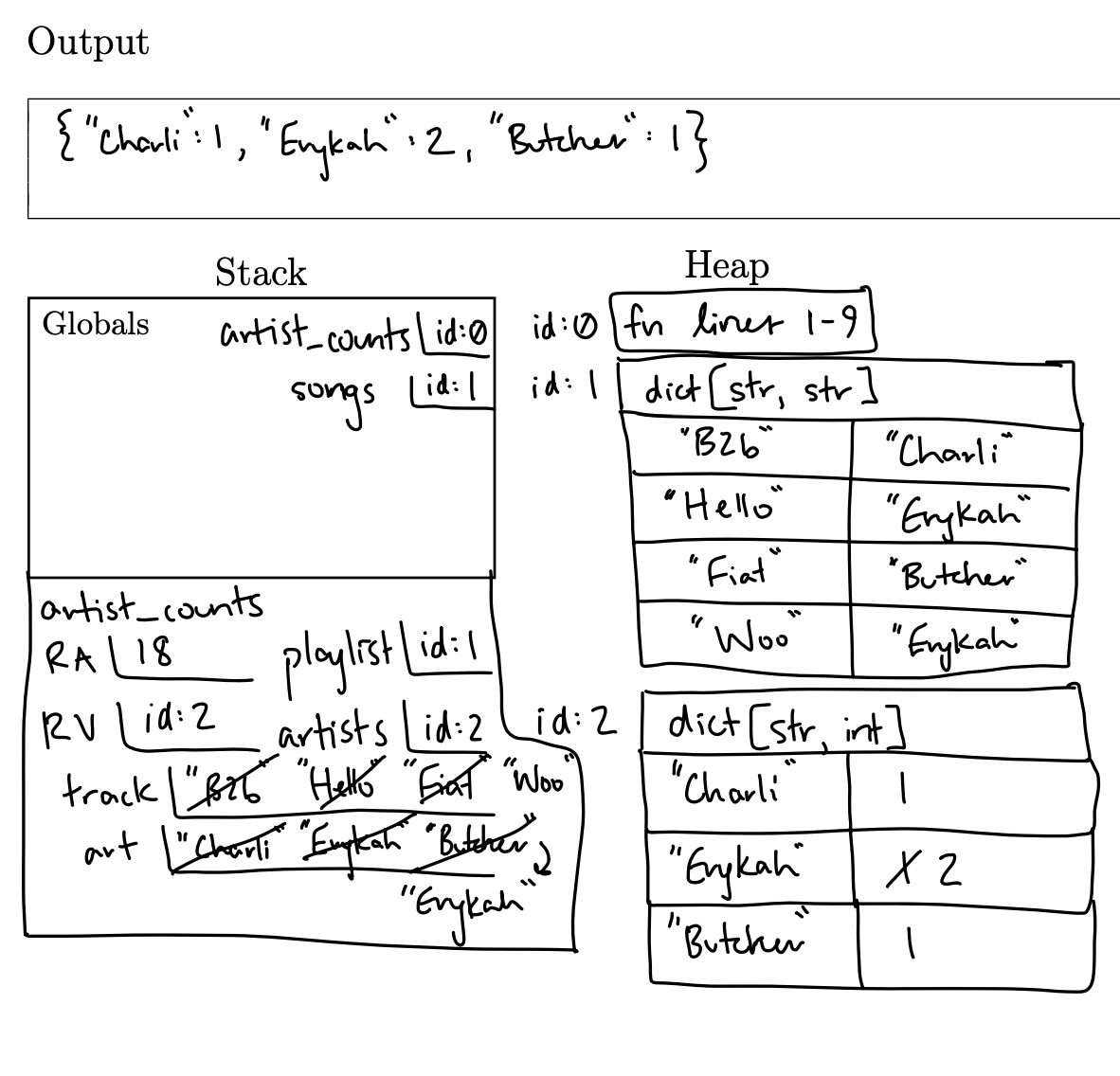
print(count(numbers))- Create a memory diagram for the following code listing.
def artist_counts(playlist: dict[str, str]) -> dict[str, int]:
    artists: dict[str, int] = dict()
    for track in playlist:
        art: str = playlist[track]
        if playlist[track] not in artists:
            artists[art] = 1
        else:
            artists[art] += 1
    return artists

songs: dict[str, str] = {
    "B2b": "Charli",
    "Hello": "Erykah",
    "Fiat": "Butcher",
    "Woo": "Erykah"
}

print(artist_counts(songs))
SHOW SOLUTIONS
Extra Practice (Lists, Dictionaries, for loops)
The following questions will refer to the list below:
python my_list: list[int] = list()1.1. Write line(s) of code that would add the number8,0,3, and-1to the list.1.2. Write line(s) of code that removes
3from the list.1.3. Write line(s) of code that assigns the variable
dogto the element at the second index.1.4. Write line(s) of code that prints the amount of items in the list.
1.5. Change the value
8to0.1.6. We now have a function,
sumthat adds the elements of my_list and returns this amount. Write a line of code that instantiates alist[int]with the first value returned from callingsumonmy_list.The following questions will refer to the dictionary below:
my_dict: dict[int, str] = {}2.1. Write line(s) of code that would add the following key-value pairs to the dictionary:
8: 'eight'0: 'zero'3: 'three'-1: 'negative one'
2.2. Write line(s) of code that removes value
three.2.3. Write line(s) of code that assign the value associated with the key
0inmy_dictto a variable calledcat.2.4. Write line(s) of code that print the number of keys in
my_dict.2.5. Write line(s) of code that print the number of values in
my_dict.2.6. Change the value associated with the key
8to'zero'.2.7. Suppose we have a function
sum_dict_keysthat sums the keys ofmy_dictand returns this amount. Write a line of code that instantiates adict[str: int]containing a single value, which is the result of callingsum_dict_keys(my_dict)and a key of “returned_amount”.The following questions will refer to the dictionary below:
my_dict: dict[int, str] = {0: "dog", 1: "cat", 2: "mouse", 3: "bird", 4: "whale"}3.1. What will print from the following code:
python for x in range(0, len(my_dict)): print(my_dict[x])dog, cat, mouse, bird, whaledog, cat, mouse, birdIndexOutOfRange0, 1, 2, 3, 4
3.2. What will print from the following code:
python for x in range(0, len(my_dict)): print(x)0, 1, 2, 3, 4dog, cat, mouse, bird, whaleIndexOutOfRange1, 2, 3, 4
3.2. What will print from the following code:
python for x in my_dict: print(my_dict[x])dog, cat, mouse, bird, whaledog, cat, mouse, birdIndexOutOfRange0, 1, 2, 3, 4
3.3. What will print from the following code:
python for x in my_dict: print(x)0, 1, 2, 3, 4dog, cat, mouse, bird, whaleIndexOutOfRange1, 2, 3, 4
3.4. What will print from the following code:
python x: int = 0 while x < len(my_dict): print(x) x += 10, 1, 2, 3, 4dog, cat, mouse, bird, whaleIndexOutOfRange1, 2, 3, 4, 5
3.5. What will print from the following code:
python x: int = 0 while x < len(my_dict): print(my_dict[x]) x += 1dog, cat, mouse, bird, whaledog, cat, mouse, birdIndexOutOfRange0, 1, 2, 3, 4
The following questions will refer to the dictionary below:
my_dict: dict[int, str] = {8: "dog", 1: "cat", 10: "mouse", 15: "bird", 0: "whale"}4.1. What will print from the following code:
python for x in range(0, len(my_dict)): print(my_dict[x])whale, cat, KeyErrorIndexOutOfRangedog, cat, mousebird, whale
4.2. What will print from the following code:
python for x in range(0, len(my_dict)): print(x)0, 1, 2, 3, 40, 1, 2IndexOutOfRange1, 2, 3, 4
4.3. What will print from the following code:
python for x in my_dict: print(my_dict[x])dog, cat, mouse, bird, whalewhale, cat, mouse, bird, dogIndexOutOfRange0, 1, 2, 3, 4
4.4. What will print from the following code:
python for x in my_dict: print(x)8, 1, 10, 15, 0dog, cat, mouse, bird, whaleIndexOutOfRange0, 1, 2, 3, 4
4.5. What will print from the following code:
python x: int = 0 while x < len(my_dict): print(x) x += 10, 1, 2, 3, 41, 2, 3, 4IndexOutOfRange0, 1, 2
4.6. What will print from the following code:
python x: int = 0 while x < len(my_dict): print(my_dict[x]) x += 1whale, cat, KeyErrorIndexOutOfRangedog, cat, mousebird, whale
The following questions will refer to the dictionary below:
my_dict: dict[str, str] = {"cat": "dog", "dog": "cat", "bird": "mouse", "mouse": "bird", "while": "whale"}5.1. What will print from the following code:
python for x in range(0, len(my_dict)): print(my_dict[x])IndexOutOfRangedog, cat, mouseKeyErrorbird, whale
5.2. What will print from the following code:
python for x in range(0, len(my_dict)): print(x)0, 1, 2, 3, 41, 2, 3, 4IndexOutOfRange0, 1, 2
5.3. What will print from the following code:
python for x in my_dict: print(my_dict[x])dog, cat, mouse, bird, whaledog, cat, mouse, birdIndexOutOfRangecat, dog, bird
5.4. What will print from the following code:
python for x in my_dict: print(x)cat, dog, bird, mouse, whiledog, cat, mouse, birdIndexOutOfRange0, 1, 2, 3, 4
5.5. What will print from the following code:
python x: int = 0 while x < len(my_dict): print(x) x += 10, 1, 2, 3, 4dog, cat, mouse, bird, whaleIndexOutOfRange1, 2, 3, 4
5.6. What will print from the following code:
python x: int = 0 while x < len(my_dict): print(my_dict[x]) x += 1IndexOutOfRangedog, cat, mouseKeyErrorbird, whale
SHOW SOLUTIONS
- List Manipulations
my_list: list[int] = list()

# 1.1. Add the numbers 8, 0, 3, and -1 to the list.
my_list.append(8)
my_list.append(0)
my_list.append(3)
my_list.append(-1)

# 1.2. Remove the number 3 from the list.
my_list.pop(2)

# 1.3. Assign the element at the second index to a variable named 'dog'.
dog = my_list[2]

# 1.4. Print the number of items in the list.
print(len(my_list))

# 1.5. Change the value 8 to 0.
my_list[0] = 0

# 1.6. Instantiate a list[int] with the first value returned from calling sum on my_list.
summed_list = [sum(my_list)]- Dictionary Manipulations
my_dict: dict[int, str] = {}

# 2.1. Add key-value pairs to the dictionary.
my_dict[8] = 'eight'
my_dict[0] = 'zero'
my_dict[3] = 'three'
my_dict[-1] = 'negative one'

# 2.2. Remove the key-value pair where the value is 'three'.
my_dict.pop(3) # recall that pop takes an index and in the case of dictionaries or indicies are essentially our keys

# 2.3. Assign the value associated with the key 0 to a variable called 'cat'.
cat = my_dict[0]

# 2.4. Print the number of keys in the dictionary.
print(len(my_dict))

# 2.5. Print the number of values in the dictionary.
print(len(my_dict))

# 2.6. Change the value associated with the key 8 to 'zero'.
my_dict[8] = 'zero'

# 2.7. Instantiate a dict[str, int] with the key 'returned_amount' and the value from sum_dict_keys(my_dict).
result_dict = {'returned_amount': sum_dict_keys(my_dict)}- Dictionary Looping and Output
- 3.1: Output = (a) dog, cat, mouse, bird, whale
- 3.2: Output = (a) 0, 1, 2, 3, 4
- 3.3: Output = (a) dog, cat, mouse, bird, whale
- 3.4: Output = (a) 0, 1, 2, 3, 4
- 3.5: Output = (a) 0, 1, 2, 3, 4
- 3.6: Output = (a) dog, cat, mouse, bird, whale
- Looping with Different Key Values
- 4.1: Output = (a) whale, cat, KeyError
- 4.2: Output = (a) 0, 1, 2, 3, 4
- 4.3: Output = (a) dog, cat, mouse, bird, whale
- 4.4: Output = (a) 0, 1, 8, 10, 15
- 4.5: Output = (a) 0, 1, 2, 3, 4
- 4.6: Output = (a) whale, cat, KeyError
- Dictionary with String Keys
- 5.1: Output = (c) KeyError
- 5.2: Output = (a) 0, 1, 2, 3, 4
- 5.3: Output = (a) dog, cat, mouse, bird, whale
- 5.4: Output = (a) cat, dog, bird, mouse, while
- 5.5: Output = (a) 0, 1, 2, 3, 4
- 5.6: Output = (c) KeyError